From your course
Create your study sheet with AI
Import your PDF to create a structured sheet to reread alongside your course, then a corrected multiple-choice quiz. Photos depend on your plan.
Free account, no credit card required. Features and volumes depend on your plan and your quotas. Compare plans
Example, no account
An example of a Fichea sheet
Go through this sheet on percentages before creating the one for your course.
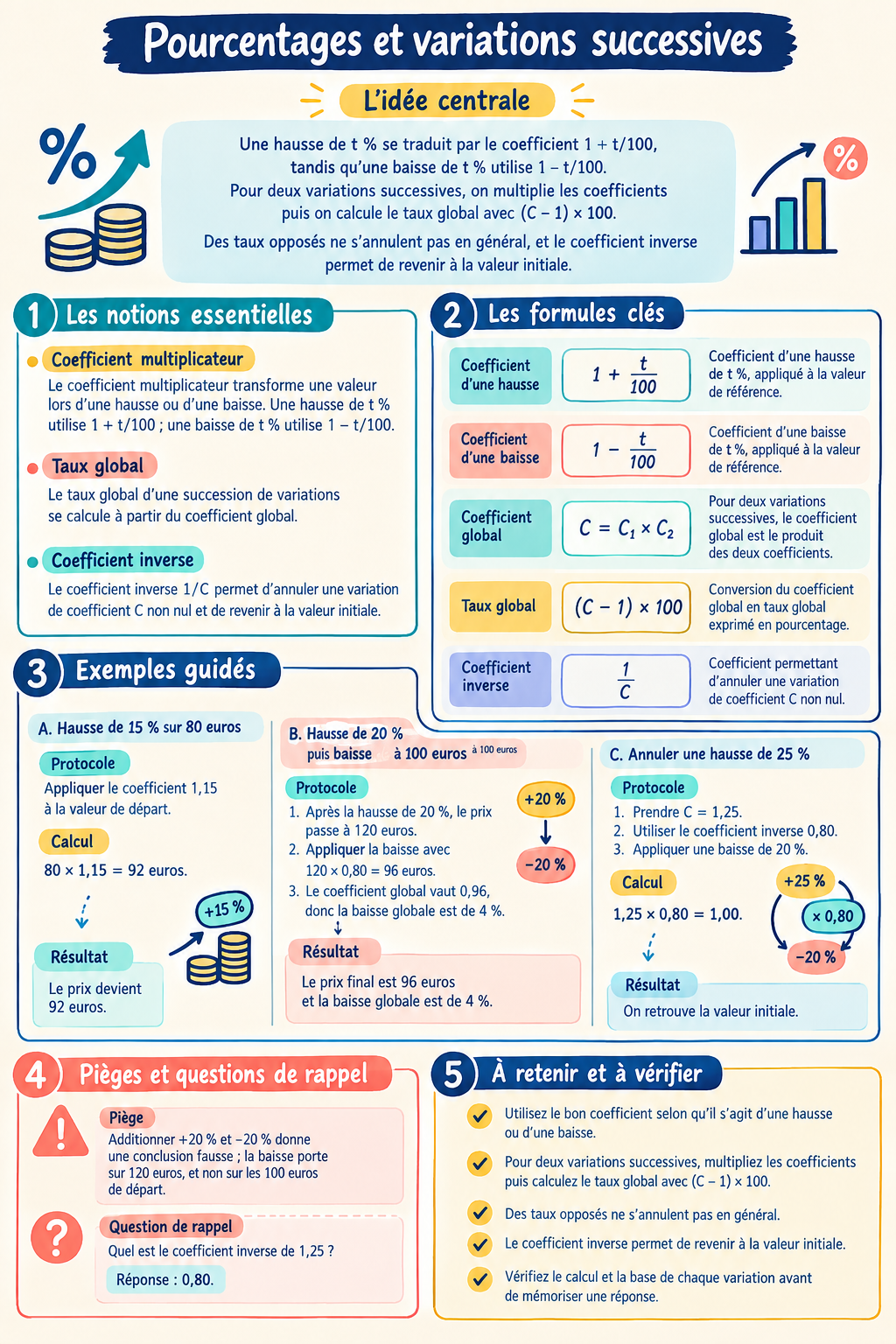
- The concepts to review
- Multiplier coefficients, overall rate and formulas are grouped on the sheet.
- Explained calculations
- The examples detail the steps, like a 20% increase followed by a 20% decrease.
- The mistakes to avoid
- The sheet explains why these two changes don’t cancel each other out and offers a recall question.
Your sheet will start from your own course. The available formats and the generation volumes depend on your plan.
Create my account to importMethods to try with your course
Examples, corrected questions and steps to prepare your next study session.
Study methods
Review for a test with sheets, quizzes and flashcards
Organize your studying from course to exercise: a sheet to structure, a quiz to test yourself, a chat to understand and flashcards to review.
Organize your studying
How do you motivate yourself to study when you procrastinate?
Start small, the two-minute rule, phone out of reach, short sessions and rewards: concrete ways to stop putting off your studying.
Organize your studying
Too many courses to review: where to start?
Too many chapters and not enough time? Take stock, sort by weight and deadline, break it into blocks and start with a test to know what to review.
Memorizing
Blurting: the blank-page method for studying
Read, close your course, write down everything that comes back, then fill in with color: the blurting method step by step, with a full example in history.
Understanding your course
How do you make a mind map for studying?
A mind map links the notions of a chapter around a central theme. How to build it from your course, an example in economics and social sciences, and its limits.
Why use Fichea for this?
How does it work?
- 1
Import your course
Take a photo of a page of your course or add a PDF. For a photo, check the recognized text before creating the sheet.
- 2
Create the sheet
Fichea turns the content into a clearer study structure.
- 3
Check the essentials
Compare the summary with your course and adjust the points that need precision.
- 4
Move on to active recall
Use quizzes and flashcards to check what you can recall without rereading.
Examples of use
- Math study sheet
- History and geography sheet with dates and landmarks
- Biology and earth sciences sheet with mechanisms and vocabulary
- Law sheet with rules, conditions and exceptions
- University sheet from a PDF handout
Frequently asked questions
Can Fichea create a sheet from a PDF?
Yes. Add a photo of your course or a PDF, then create your sheet. Access to photos depends on your plan, and the legibility of the text matters.
Does the generator work for all subjects?
Fichea doesn't impose a closed list of subjects: it works from the imported course. The result should still always be checked against your original material.
Does an AI sheet replace exercises?
No. A sheet helps organize and memorize the course; for reasoning or calculation subjects, exercises remain essential.